Repository navigation


|
Can you help me how to get the “Arguments” value read out? |
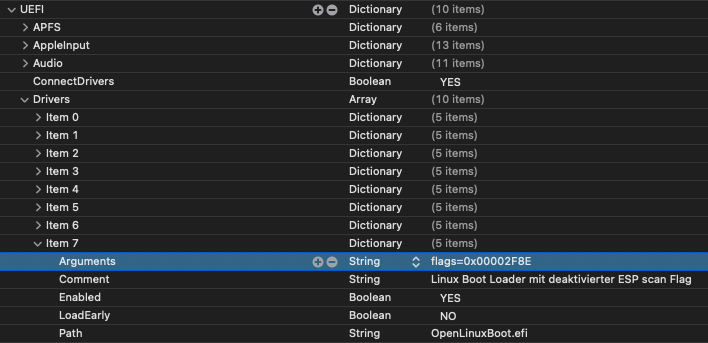
Replies: 3 comments 11 replies

|
Assuming the plist file is loaded into a PList object. For example: let url = URL( ... )
let plist = PList(url: url)With PListKit, arrays are of type This means we need to conditionally cast. To access the Drivers array: guard let driversArray = plist.root
.dict(key: "UEFI")
.array(key: "Drivers")
.value? // get the Drivers array as PListArray
.compactMap({ $0 as? PListDictionary }) // map array items to dictionaries
else { return }Then you can iterate or use indexes to access the array. Again, dictionaries are another type that can contain values of varying type. With PListKit, arrays are of type To get the Arguments string, subscript the resulting dictionary and conditionally cast the value type. driversArray.forEach { driverDict in
guard let arguments = driverDict["Arguments"] as? String else { return }
print(arguments)
} |
|
Thank you for the explanation |
|
Reading worked wonderfully. Thank you once again |

|
Actually, this may be a bug. Let me dig into it and I should be able to resolve it. |

|
Thanks for your help That kind of thing still works plist.root
.string(key: "UEFI")
.value = "string value" |
|
If you set I'm trying to figure out why, and will push a new release with a fix when I'm able. |
|
I've fixed the bug and released version 2.0.2. Thanks for catching this - it was an edge case that unit tests weren't covering. |
|
Thanks, works |


Assuming the plist file is loaded into a PList object. For example:
With PListKit, arrays are of type
PListArraywhich can contain any concrete type supported by the PList format (String, Int, Bool, Array, Dictionary, etc.).This means we need to conditionally cast.
To access the Drivers array:
Then you can iterate or use indexes to access the array.
Again, dictionaries are another type that can contain values of…